


Payment Guide :
Paying with USDT (TRX)

To ensure your transactions are fast, secure, and low-fee, we accept USDT (Tether) via the TRON (TRC-20) network through our partner, NOWPayments. Follow the guide below based on whether you already own crypto or are a first-time user.

If You Already Have a Crypto Wallet

Step 1: Initialize the Payment

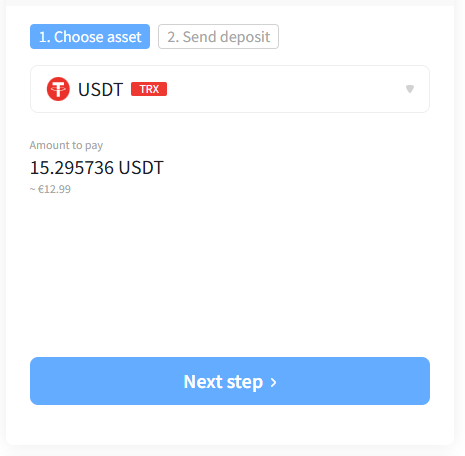
After clicking “Checkout” on our website, you will be redirected to the NOWPayments gateway.

  • You will see the total amount due in USDT (TRX).
  • Click the blue “Next step >” button to generate your unique payment address.

Step 2: Send the Funds

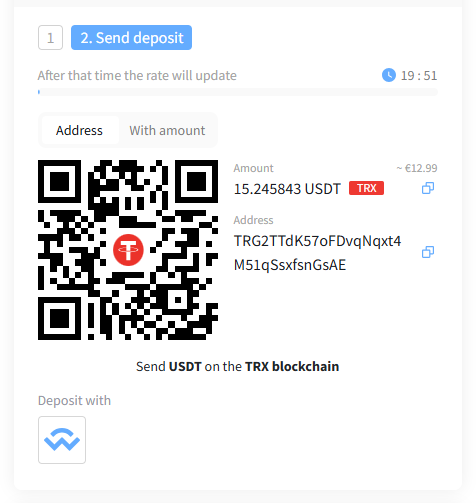
The system will now display a QR Code and a Wallet Address.

  1. Scan or Copy: Scan the QR code with your wallet app, or click the Copy icon next to the address and amount.
  2. Verify the Network: Open your wallet and select Withdraw/Send. You MUST select the TRC-20 (TRON) network.
  3. Confirm the Amount: Ensure you send the exact amount shown on the screen.

Step 3: Send Your Payment

Go to your wallet and send the exact amount shown.

USDT exists on many networks. You MUST select the TRC-20 network in your wallet. If you send via Ethereum (ERC-20) or BSC, your funds will be lost forever.

💳 Buy your IPTV with a different payment gateway

Pay directly from the different payment gateways in seconds. No cash advance fees, no credit balance to manage, no waiting for a transfer to land. The familiar card checkout, with your IPTV on the way as soon as the authorization clears.

HOW TO PAY WITH DEBIT CARD

Step 1: Set Up Your Purchase

  • Go to the Buy tab on the payment widget.

  • In the “You send” field, select your currency ( EUR ) and enter the amount of IPTV subscription you wish to pay.

  • In the “You get” field, select the required ( USDT TRC20).

Step 2: Select Your Payment Method

  • Under the payment options, select the payment that suits you. We recommend Visa/Mastercard (indicated by the credit/debit card icons), to ensure your payment goes through smoothly.

  • Click the Buy button to proceed.

Step 3: Enter Address

  • Copy the address wallet from the button below
				
					TGV9RyNipoeih5f47cyuPodgJypcUU1A6z


TGV9RyNipoeih5f47cyuPodgJypcUU1A6z

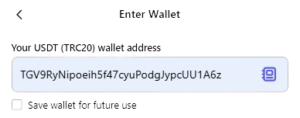
  • Copy and paste this address into the “Your USDT (TRC20) wallet address” field, like in the image below.
  • Click Buy to move forward.

Step 4: Select "New Card"

  • Once the secure payment screen loads, scroll down past the default express options and select “+ New card”.
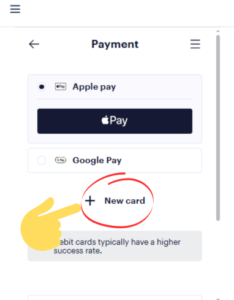
  • Note: Using a direct debit card typically yields the highest transaction success rate.

Step 5: Fill in Card and Billing Details

  • Card Info: Enter your Card Number, Expiration Date, and CVV code.
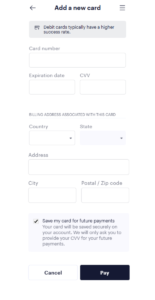
  • Billing Address: Scroll down and enter the billing address associated with your card

  • (Optional) Keep “Save my card for future payments” checked for faster future checkouts.

Step 6: Authorize & Complete Payment

  • Review the final purchase summary at the bottom of the widget.

  • Click the dark Pay button to process the transaction.
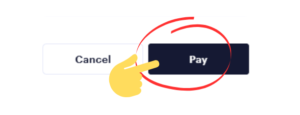
  • Depending on your bank, you may be prompted to complete a quick 3D Secure verification (such as entering an SMS code sent to your phone).

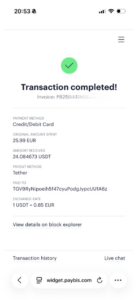
Final step : Transaction completed

When the payment is completed, send us the invoice number to deliver your IPTV subscription, or just send a screenshot like image in below and send it on over support on WhatsApp or email
Frequently asked questions

Yes. VISA, Mastercard, and Maestro debit cards are supported as a payment method for IPTV purchases. The card needs to be issued in a supported region and able to authenticate via 3D Secure

A debit card draws funds straight from your bank balance the moment the order is authorized – there is no interest and no cash advance markup. A credit card borrows the amount from your line of credit, which some issuers treat as a cash advance purchase (adding a flat fee plus daily interest from day one). For most buyers, debit is cheaper end-to-end.

3D Secure – “Verified by Visa”, “Mastercard ID Check”, or your bank’s branded version – is the layer that confirms it is actually you using the card. It runs as a one-time SMS code, a push notification in your banking app, or an in-app biometric. Every card-funded order on the platform passes through it before it is released.

The card authorization is processed in seconds. After that, a wer support will deliver your IPTV to your Email or WhatsApp, typically taking 10-30 minutes during normal load

Most declines come from one of three sources: 3D Secure timed out before you approved it, or the card is from a region the platform does not support. Try a second supported card from a different issuer, or fall back to a bank-transfer rail like SEPA.

💳 Payment Guide

Pay directly from the different payment gateways in seconds. No cash advance fees, no credit balance to manage, no waiting for a transfer to land. The familiar card checkout, with your IPTV on the way as soon as the authorization clears.
